
SOWMIYA S
Architecture Tutor at SketchUp & AutoCAD University - Design & Technical Training
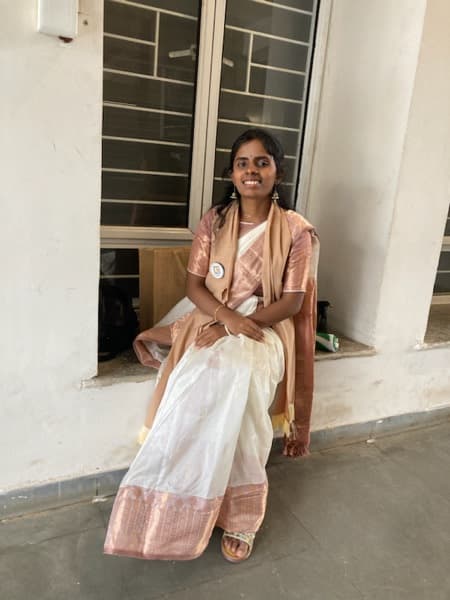




SketchUp classes - SOWMIYA S
Bachelors degree
$20
$18
/ hour
About your tutor
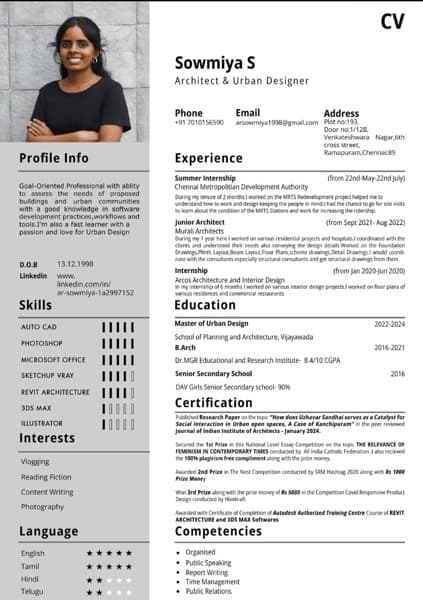
With a background of Masters in Urban Design and Bachelors in Architecture.I have over 8+ years of working in softwares of Autocad,Sketchup-Vray and Adobe Photoshop. I have worked in large scale to small scale projects and particularly good with different Architectural softwares.I'm a pro at Photoshop,Sketchup-Vray and Autocad. I have Published Research Paper on the topic "How does Uzhavar Sandhai serves as a Catalyst for Social interaction in Urban open spaces, A Case of Kanchipuram" in the peer reviewed Journal of Indian Institute of Architects. I was awarded 2nd Prize in The Nest Competition conducted by RM Hashtag 2020 along with Rs 1000Prize Money.I have also won 3rd Prize along with the prize money of Rs 5000 in the Competition Covid Responsive Product Design conducted by Hivekraft.I have completed Autodesk Authorized Training Centre Course of REVIT ARCHITECTURE and 3DS MAX Softwares. I have tutored various of my fellow juniors about the software skills that is needed for succeeding as a great Architect.I always recieve postive feedback from my students and they keep coming back to me to learn more.The tutoring sessions are mostly for high school and university graduates. I explain everything clearly and patiently, clearing up all of my pupils' doubts. I also assist pupils with their coursework and homework.
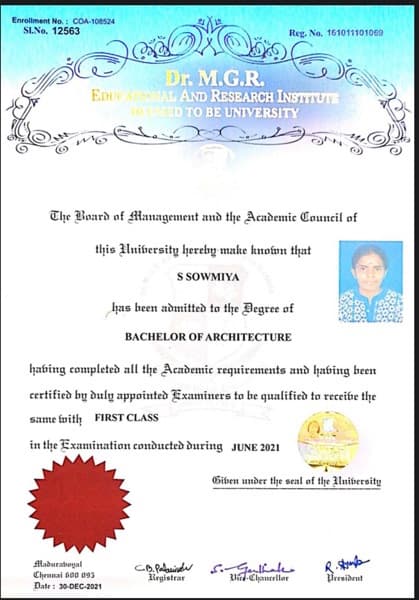
SOWMIYA graduated from DR MGR EDUCATIONAL AND RESEARCH INSTITUTE
Class overview
I offer private tutoring lessons in Autocad,Sketchup-Vray,Photoshop and English speaking,reading and writing skills to school and university students.My teaching tactics are completely dependent on the needs of the students. Each student's learning requirements are unique. In my lessons, I try to combine concepts with hands-on design projects. In addition, I enjoy listening to student questions and clarifying them. I aim to keep students as engaged in class discussions as possible. I also help students with their homework, tasks, and test preparation.

Mastery of CAD software in 4 weeks
90% of students feel confident using AutoCAD, Rhino, and Revit.

Real-time design feedback
Students value instant feedback that improves results.

Flexible scheduling for busy designers
90% of students easily schedule lessons around their projects.
Specialities of your tutor

3D modeling

Upskilling

Project help

Portfolio Development

State-Specific Standards (USA)

Exam prep

Technical drafting

To protect your payment, never transfer money or communicate outside the Wiingy website or app.

Architecture concept taught by SOWMIYA
Sowmiya tutored Destiny in AutoCAD, reviewing basic drawing commands and introducing modify commands. Destiny practiced using "move," "copy," "rotate," "mirror," "scale," and "stretch" commands, focusing on base point selection and object snaps. Sowmiya assigned practice exercises and will provide a summary screenshot for Destiny to review before their next session.
Mid Between Two Points
Stretch Command
Scale Command
Mirror Command
Block Command
Copy Command with Base Point
Move Command with Base Point
Object Snap
Sowmiya tutored Claudio on basic AutoCAD functions, including setting units, drawing lines, rectangles, circles, and arcs, and using specific measurements. Claudio practiced these commands with Sowmiya's guidance, troubleshooting software version issues along the way. They scheduled the next session for Tuesday at 8:30 PM, and Sowmiya recommended Claudio review the command list and practice independently.
Arc Command
Pan and Zoom
Selection and Escape
Line Command
Circle Command
Rectangle Command
Units Setup
Sowmiya taught Claudio the basics of AutoCAD, including setting units, drawing lines, rectangles, circles, arcs, and polylines, and navigating the interface. They discussed applying these skills to tile layout. Sowmiya assigned practice and will provide a command shortcut sheet, with the next session scheduled for practical screen-sharing.
Opening AutoCAD Drawing
Angular Line
Straight Line (F8)
Zooming and Panning
Arc Command
Polyline Command
Circle Command
Rectangle Command
Your tutor also provides training in

SketchUp
Architecture
AutoCAD
Free lesson slots
1 / 1
Teaching tools used for classes

Assessments

Presentations

Drafting tools

Rendering Tools

Technical Drawing Tools
Student types for class

School

College
Adult/Professionals

All levels

Anxiety or Stress Disorders

Home schooled
Interactive training

Record lessons

Note taking

Pets are welcomed

Parent feedback

Mobile joining
Find training in similar 3D modelling tools


Architecture tutor on Wiingy are vetted for quality
Every tutor is interviewed and selected for subject expertise and teaching skill.