
SOWMIYA S
Architecture Tutor at SketchUp & AutoCAD University - Design & Technical Training


Show all photos
SOWMIYA S
Bachelors degree
/ 55 min
About your tutor
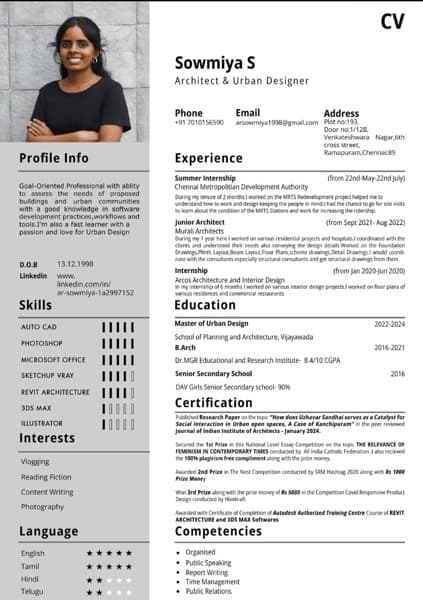
With a background of Masters in Urban Design and Bachelors in Architecture.I have over 8+ years of working in softwares of Autocad,Sketchup-Vray and Adobe Photoshop. I have worked in large scale to small scale projects and particularly good with different Architectural softwares.I'm a pro at Photoshop,Sketchup-Vray and Autocad. I have Published Research Paper on the topic "How does Uzhavar Sandhai serves as a Catalyst for Social interaction in Urban open spaces, A Case of Kanchipuram" in the peer reviewed Journal of Indian Institute of Architects. I was awarded 2nd Prize in The Nest Competition conducted by RM Hashtag 2020 along with Rs 1000Prize Money.I have also won 3rd Prize along with the prize money of Rs 5000 in the Competition Covid Responsive Product Design conducted by Hivekraft.I have completed Autodesk Authorized Training Centre Course of REVIT ARCHITECTURE and 3DS MAX Softwares. I have tutored various of my fellow juniors about the software skills that is needed for succeeding as a great Architect.I always recieve postive feedback from my students and they keep coming back to me to learn more.The tutoring sessions are mostly for high school and university graduates. I explain everything clearly and patiently, clearing up all of my pupils' doubts. I also assist pupils with their coursework and homework.
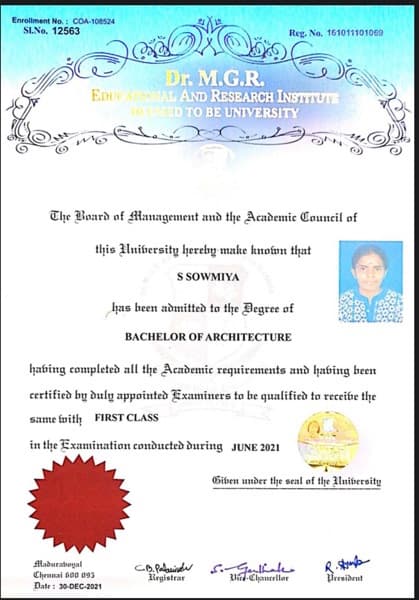
SOWMIYA graduated from DR MGR EDUCATIONAL AND RESEARCH INSTITUTE
Expertise of your tutor

Software training

Exam prep

State-Specific Standards (USA)

Technical drafting

Common Core State Standards - CCSS (USA)

Project help

Career guidance
 CoTutor
AI modules
Summary
Podcast
Quiz
Learnings
Flashcard
Spotlight
Zero Risk Guaranteed
15-days refund
Free tutor swap
No cancel fee
1-yr validity
24/7 support
Student types for class

Architecture for advanced

Anxiety or Stress Disorders

Home schooled
Architecture for intermediate
Architecture for beginners
Class overview
I offer private tutoring lessons in Autocad,Sketchup-Vray,Photoshop and English speaking,reading and writing skills to school and university students.My teaching tactics are completely dependent on the needs of the students. Each student's learning requirements are unique. In my lessons, I try to combine concepts with hands-on design projects. In addition, I enjoy listening to student questions and clarifying them. I aim to keep students as engaged in class discussions as possible. I also help students with their homework, tasks, and test preparation.
SOWMIYA - also provides training in

Architecture
AutoCAD
SketchUp

Architecture concepts taught by SOWMIYA
The Student and Tutor practiced various AutoCAD commands for object manipulation and geometry editing. They focused on using 'Scale', 'Align', 'Rotate' with reference, 'Hatch', 'Fillet', and 'Polyline Edit' on architectural elements. The session aimed at improving precision and efficiency in CAD drafting techniques.
Rotate (RO) with Reference
Hatch (H) & Hatch Editing
Join (J) Command
Align (AL) Command
Scale (SC) with Reference
Fillet (F) & Polyline Edit (PEDIT)
The Student and Tutor practiced various AutoCAD commands for precise object manipulation. They focused on using `Align` for fitting objects, `Scale` with reference, `Fillet` for corner radius control, `Trim` with reference lines, and `Hatch` using both pickpoints and selection methods. The Student plans to practice these commands and continue in the next session on Monday.
Fillet Command (F) and Radius (R)
Hatch Command (H) - Pick Points vs. Select Objects
Trim Command (TR) with Reference Lines
Scale Command (SC) with Reference (R)
Align Command (AL)
The Student and Tutor worked through practical AutoCAD tasks, focusing on setting up layouts, managing title blocks and scaling drawings. They troubleshooted plotting issues, including line visibility and types, and discussed document control through sheet numbering and revisions. The next session will focus on fundamental AutoCAD commands.
Plotting and Exporting Drawings
Title Blocks and Legends
Controlling Viewport Scale
Creating Viewports in Layouts
AutoCAD Paper Space vs. Model Space
The Student and Tutor reviewed a wide range of AutoCAD commands for object modification, line manipulation, block editing, and layer management. They also practiced using the `Hatch` command, managing draw order, and calculating areas using different methods. The Student plans to practice these commands before the next session.
Advanced Object Modification (Align
Fillet
Join)
Precise Object Placement (Move & Copy)
Calculating Areas in Your Drawing
Scaling Objects Using a Reference
Efficient Object Management (Blocks vs. Groups)
Layer Control and Efficient Object Selection
The student practiced advanced graphic design techniques in Photoshop, focusing on correct file setup, layer management, and applying patterns and textures to selected areas. The tutor provided step-by-step guidance and troubleshooting for issues encountered with selection tools, pattern application, and layer manipulation. They planned to schedule follow-up sessions to continue refining these skills.
Correct Canvas Setup
Importing and Manipulating PDFs
Layer Management and Adjustment Layers
Selection Tools and Applying Patterns
Transformations and Opacity for Transparency
The student received guidance on scaling architectural plans for model-making and refining drawing details. The tutor then provided an introductory lesson on using Adobe Photoshop for design, covering document setup, layers, selection tools, and editing techniques, with plans to continue this instruction in the next session.
Scale and Model Proportions
CAD Drawing Conventions: Line Visibility and Level Notation
Photoshop Fundamentals: Layers
Rasterization
and Basic Editing
Seamless Textures and Pattern Overlay in Photoshop
Teaching tools used for classes

Presentations

3D Modeling

Rendering Tools

Assessments

Drafting tools
Training focussed classes

Record lessons

Open Q&A

Chat for quick help

Pets are welcomed

Weekend lessons
Find training in similar 3D modelling tools


Architecture tutors on Wiingy are vetted for quality
Every tutor is interviewed and selected for subject expertise and teaching skill.
